Ahorra POS · Electronic invoicing
e-CF electronic invoicing, straight from your point of sale
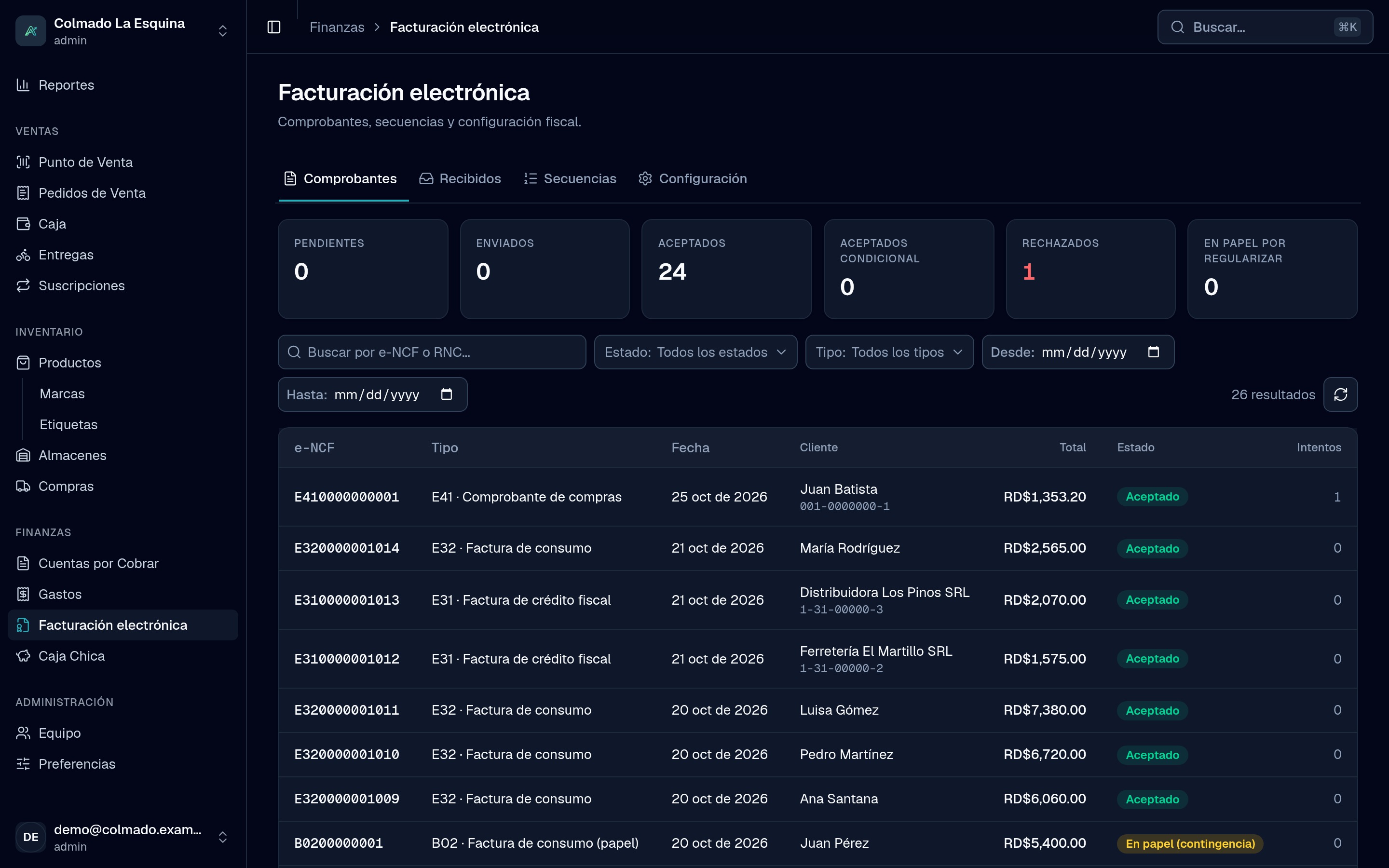
Ahorra POS issues your DGII-valid electronic tax receipts every time you charge: signed, sent and with their status in view. Included in every plan.
Law 32-23 brings electronic invoicing to every taxpayer, in stages. With Ahorra POS you need no other system to comply.
The receipts you issue
Each type comes from where it happens: the sale, the return, the purchase or the expense.
- E31
Tax credit
For customers with an RNC who deduct the ITBIS.
- E32
Consumer
For the final consumer, with the RFCE summary on smaller sales.
- E33
Debit note
For charges added to an invoice already issued.
- E34
Credit note
When you void a sale or make a partial return.
- E41
Purchases
When you buy from an informal supplier, with its withholdings.
- E43
Minor expenses
For your business’s minor expenses, recorded from Expenses.
- E44
Special regimes
For customers in free zones and other special regimes.
- E45
Government
For sales to state institutions.
E41 and E43 are issued from Purchasing and Expenses, included from the Pro plan.
How it works
- 1
You sell
You pick the receipt type at the register; the customer and their RNC come already validated.
- 2
It is signed
Ahorra POS builds the e-CF and signs it with your business’s digital certificate.
- 3
It reaches the DGII
It is sent on its own and you see its status: accepted, conditionally accepted or rejected, with retries.
- 4
Your customer gets the invoice
Printed on 80 mm or letter paper, with the QR code, the security code and the e-NCF.
Everything electronic invoicing asks for
Invoice with a QR code
Printed representation on an 80 mm ticket or letter paper, with a QR code and security code.
Status at the DGII
Each receipt with its status, its messages and alerts when something needs your attention.
e-CFs from your suppliers
You receive their receipts, approve or reject them at the DGII and record them as expenses (from the Pro plan).
Contingency mode
If you cannot issue electronically, you keep invoicing with series B and regularize it later with e-CFs.
e-NCF sequences
Your authorized ranges in one place, and voiding the ones you did not use at the DGII.
606, 607 and 608 reports
Your purchases, sales and voids ready to file, with the e-CFs in the sales book.
We guide you through certification
To issue e-CFs, each business certifies as an electronic issuer with the DGII. Ahorra POS walks you through it step by step, and our team supports you along the way.
- Your digital certificate, stored encrypted
- The DGII tests, step by step from the app
- A checklist before you start issuing
Frequently asked questions
Does electronic invoicing cost extra?
No. It is included in every Ahorra POS plan.
What do I need to start issuing e-CFs?
Your RNC, your digital certificate to sign and the certification as an electronic issuer with the DGII. We guide you at every step.
What if the DGII does not answer?
The receipt stays signed and Ahorra POS retries it until it gets the answer. If you cannot issue electronically, contingency mode lets you keep invoicing.
Can I receive my suppliers’ e-CFs?
Yes, from the Pro plan: you receive them in Ahorra POS, approve or reject them and record them as expenses.
Start invoicing electronically
We show you electronic invoicing with a business like yours and explain the certification.