Dashboard and reports
See at a glance how much you sold, earned and spent, and review the sales book, ITBIS, withholdings, results and inventory.
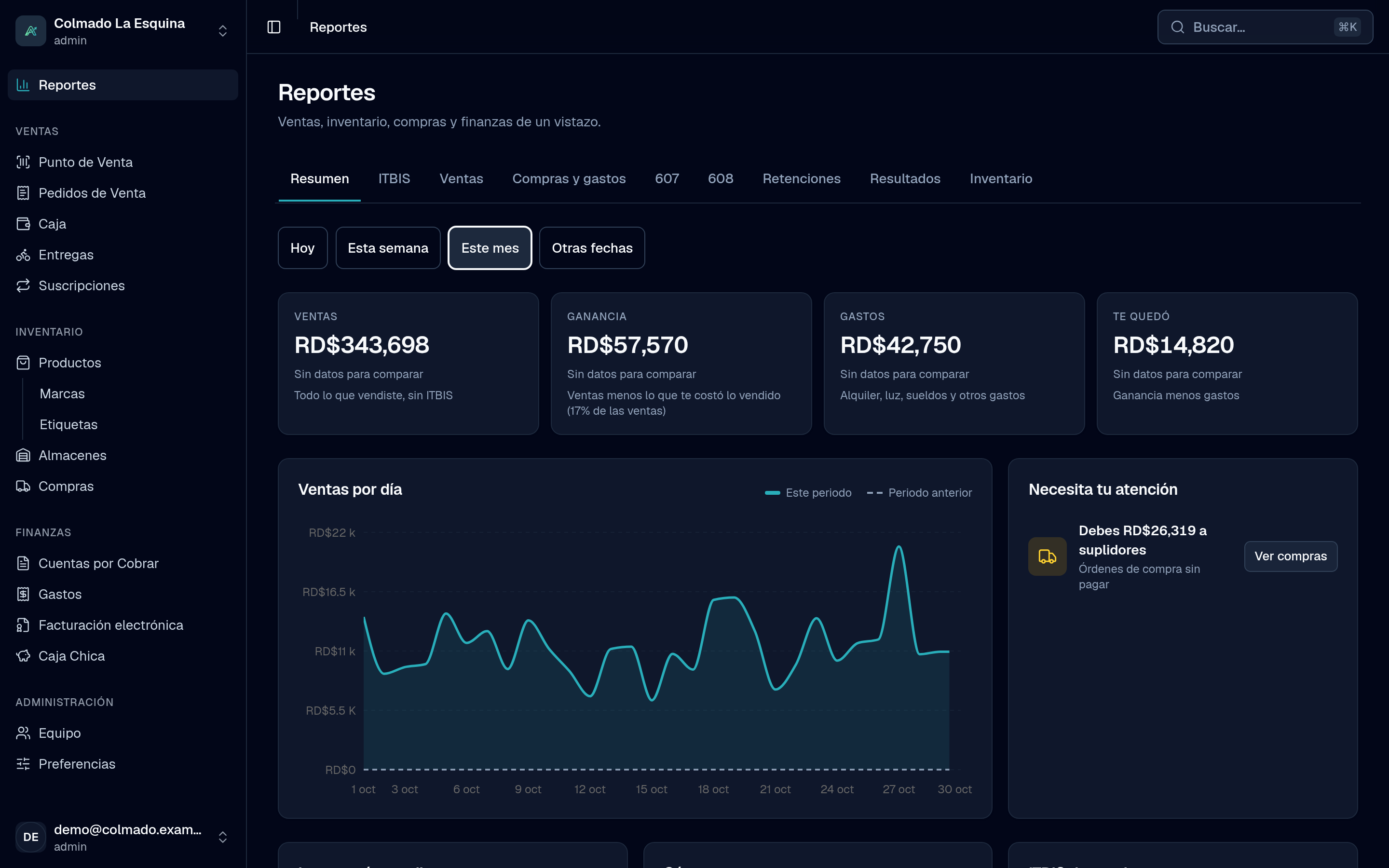
Reports brings together on one page how your business is doing: what you sold, what you earned, what you owe and what you’re owed, plus the books your accountant needs every month.
Who can see it
Administrators (the admin role). Reports sits at the very top of the menu.
Summary
The Summary tab is your dashboard. At the top you pick the Period: Today, This week, This month or Other dates (with From, To and quick ranges such as Last month or Last 30 days). You’ll see:
- Sales (without ITBIS), Profit (sales minus what the goods you sold cost you), Expenses and What you kept (profit minus expenses), each compared with the period before.
- Sales by day, against the period before.
- Needs your attention: products out of stock or running low, overdue credit sales, overdue expenses and what you owe suppliers, with a button to go and sort it out.
- Your best sellers and How you got paid (cash, card, transfer or on credit).
- The month’s ITBIS: what you collected, what you paid on purchases and expenses with an NCF, and an estimate of what you’d have to pay.
The other tabs
- ITBIS: the month’s figures to prepare the IT-1, with sales by rate (18%, 16% and exempt).
- Sales: the month’s sales book, sale by sale, with customer, RNC or cédula, NCF and payment method. Filter by Payment and by NCF (With NCF, Without NCF, e-CF only or Paper only).
- Purchases & expenses: the month’s 606 and expenses by type. Available from the Pro plan; see pricing.
- 607 and 608: previews of those DGII formats.
- Withholdings: what you withheld from suppliers and what your customers withheld from you.
- Results: the income statement (net sales, cost of goods sold, gross profit, operating expenses and result before taxes). Pick the From and To months and, if you like, turn on Compare with the period before.
- Inventory: your inventory valued at cost, product by product. Filter by Warehouse and by Status (Out of stock, Running low or Normal).
The monthly reports have a Month filter that starts on the current month. We explain the DGII ones in Tax reports 606, 607 and 608.
Export to CSV
- Open the tab you want (ITBIS, Sales, Withholdings, Results or Inventory).
- Set the month and the filters.
- Tap Export CSV at the top right.
The file holds what you see on screen, with headers in the app’s language, and opens in Excel or Google Sheets. The Summary isn’t exported. If the table is empty, the button doesn’t show.
Important: the ITBIS to pay, the withholdings and the results are estimates to help you prepare your returns. Confirm them with your accountant before filing.
Tip: if your profit looks higher than usual, check the note under Results: a product sold without a recorded cost counts as zero cost. Give it a cost in the catalog so the report adds up.
Related articles
Didn’t find what you were looking for?
Write to us on WhatsApp or through the contact form and we will help.